“A good discussion increases the dimensions of everyone who takes part.”
—Randolph Bourne
What is Hypothes.is?
Reading and discussion do not have to stop when class ends—Hypothes.is lets students engage with texts and classmates in a dynamic, interactive way. In short, Hypothes.is is a collaborative annotation platform that allows for group discussions through the annotation of course texts, offering an interactive way to engage with the material. The platform functions similarly to social media, where users can comment, reply, and highlight sections of text in real-time, providing a familiar, accessible way to discuss readings outside the classroom. This is a great opportunity for students who may feel shy about speaking up in class to engage with both the texts and their peers without pressure.
How to Create a Hypothesis Account, Install the Chrome Extension, and Join the Class Group
Step 1: Use a Chromium-Based Browser
Before you begin, make sure you are using a Chromium-based browser, such as Google Chrome or Microsoft Edge. Other browsers, such as Firefox or Safari, do not support the Hypothesis extension directly, making it difficult to install.
Step 2: Create a Hypothesis Account
Sign Up
- Open your browser and go to Hypothes.is.
- Click the Sign-up button in the top-right corner.
- Fill out the registration form with your email address, username, and password.
- Agree to the terms of service and complete the registration.
- Verify your email: Hypothesis will send you a confirmation email—click the link inside to verify your account.
Step 3: Install the Hypothesis Chrome Extension
Visit the Installation Guide
Go to the Hypothesis Help Page to find installation instructions.
Install from the Chrome Web Store
You can also go directly to the extension page: Hypothesis Web & PDF Annotation.
Add the Extension
- Click “Add to Chrome”.
- A pop-up will appear—click “Add extension”.
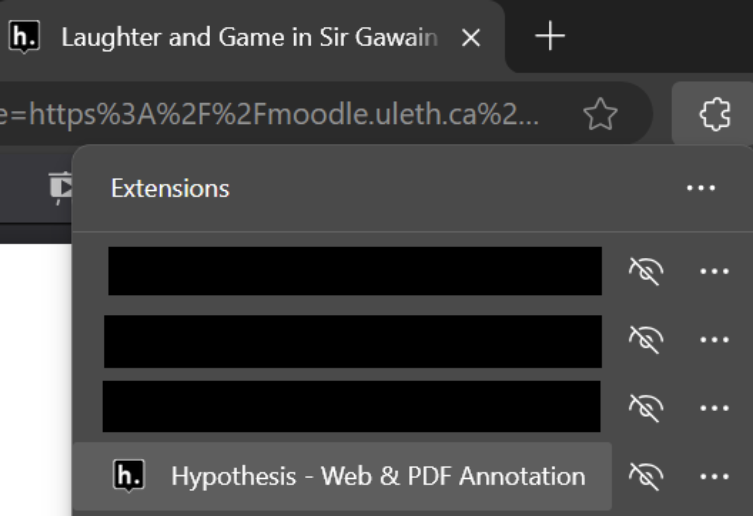
- After installation, the Hypothesis icon should appear in your browser toolbar. If not, click the puzzle icon (extensions menu) and pin the Hypothesis extension.
Step 4: Join the Class Group
To collaborate and view shared annotations in your class, you must join the class group.
- Click this link to join: ENGL4000 - Love & Discourse.
- Sign in to your Hypothesis account.
- Click “Join Group” to become a member.
- Once joined, you can view, add, and respond to group annotations.
Step 5: Enable PDF Viewing in Chrome
For Hypothes.is to work properly, PDFs must open directly in your browser.
Enable in Chrome:
- Open Chrome settings (click the three-dot menu in the top-right corner).
- Navigate to Privacy and security > Site Settings > Additional content settings > PDF documents.
- Enable “Open PDFs in Chrome.”
Enable in Microsoft Edge:
- Open Edge settings (three-dot menu in the top-right corner).
- Go to Cookies and site permissions > PDF documents.
- Disable “Always download PDFs.”
Step 6: Start Annotating
Finding Your Texts
- Log in to Moodle and navigate to the course page.
- Find the PDF of the assigned reading (do not download it—open it directly in your browser).
Activate Hypothesis
- Open the PDF and click the Hypothesis icon in your browser toolbar.
- Highlight any text you want to comment on.
- Click Annotate to add your thoughts.
- You can also Highlight text without adding a comment.
Important: Make Sure Annotations Are Shared with Your Group
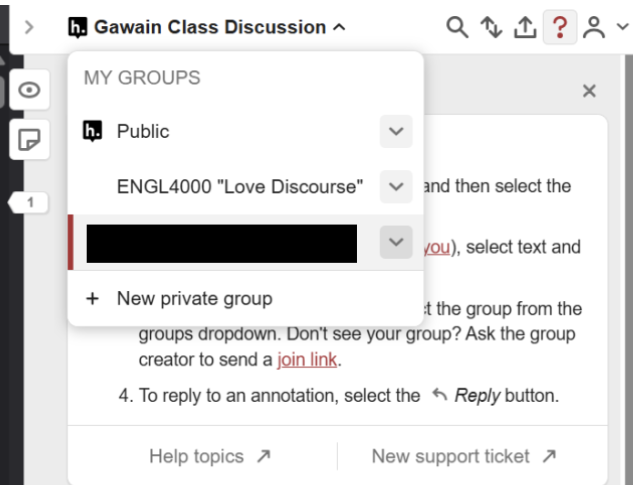
In the Hypothesis sidebar, ensure you’re annotating under the “ENGL4000” group; otherwise, your classmates won’t see your notes.
General Instructions for Virtual Class Discussions
Use Hypothesis to annotate assigned readings in each module. Annotations should reflect your understanding, insights, and discussion points.
How to Complete the Assignment:
- Find the Assigned Reading
- Log in to Moodle and locate the PDF.
- Check the syllabus for reading assignments.
- If unsure, ask your instructor.
- Annotate the Text
- Highlight passages that stand out to you.
- For each annotation, explain:
- Why you chose this passage.
- Any connections to class discussions or themes.
- Any questions or uncertainties.
Provide at least 3 annotations.
- Engage with Classmates
- Read and respond to at least 2 annotations made by classmates.
- Expand on their points, add insights, or present a different perspective.
How This Impacts Your Grade
This is a Pass/Fail component, affecting your Attendance and Participation grade. The effort you invest will directly contribute to your success in the course.
- Active engagement with annotations will help reinforce your understanding.
- Periodically review class annotations to refresh your knowledge.
- Enjoy the process! Learning should be interactive and meaningful.
Final Thoughts
By following these steps, you should now have a Hypothesis account and be ready to collaborate with your classmates by annotating PDFs directly in your browser.
If you have any questions or need help, feel free to reach out! 🚀
]]>